
Lesson 10: Programming in the Wolfram Language
“Programming is the art of telling another human what one wants the computer to do.”— Donald Knuth
“Code is like humor. When you have to explain it, it’s bad.”— Cory House
Introduction
Welcome to Lesson 10, where we take the Wolfram Language (WL) from a handy calculator to a full-blown programming system. We began our study of WL back in Lesson 5 and we have been using it as a very powerful tool. Now, it’s time to level it up; we’re diving into programming—writing instructions to make WL solve problems, crunch data, and even operate in parallel.
Variables and Data Types
Programming in the Wolfram Language (WL) starts with giving names to things, what we call assignment. We call these things variables, similarly to what we do in algebra. The kinds of things that can be variables are what we call data types. As we dive into programming, variables let you store and change values while data types tell WL how to handle them.
A variable is like a labeled box. You assign it a value with the equals sign =, like v = 5 for a velocity, and WL remembers it for later.
Here is an example.
Now wee can manipulate it.


Variables can hold different data types: numbers (integers like 9, decimals like 3.14), symbols (like x for an unknown), or even strings (text enclosed in quotation marks, like "time"). We can examine how WL sees what you have done. To do this we use the Head command.

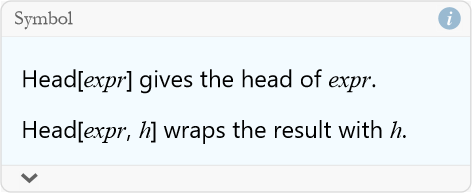
For example, we apply this to our example above.


Terms and Definitions
Term/Definition 10.1 Variable: A named "box" or symbol that stores a value (number, expression, string, etc.); assigned with = (e.g., v = 9).
Term/Definition 10.2 Data type: The kind of value a variable holds (e.g., integer, real number, symbol, string); WL determines it automatically.
Term/Definition 10.3 Symbol: A named identifier (e.g., x, a, v) treated as an abstract variable (not evaluated to a number unless assigned).
Term/Definition 10.4 String: Text data enclosed in quotation marks (e.g., "time"); used for labels, messages, or text output.
Term/Definition 10.5 Head[] (Wolfram Language function): A command that returns the data type or head of an expression (e.g., Head[9] → Integer, Head[x] → Symbol).
Term/Definition 10.6 Head (concept): The type or "class" of an expression in WL (e.g., Integer, Real, Symbol, String, List, Plus, Times).
Assumptions (the implicit beliefs the author relies on)
Assumption 10.1: Variables are essential for storing and reusing values in programming and physics calculations.
Assumption 10.2: Assignment with = stores values for later use (variables remember values until changed or cleared).
Assumption 10.3: Wolfram Language automatically determines and tracks data types (no need for explicit declarations).
Assumption 10.4: Different data types (Integer, Real, Symbol, String) are handled differently by WL operations.
Principles
Principle 10.1: Use variables to name and store values — makes code readable and reusable (e.g., v = 9 for velocity).
Principle 10.2: WL is dynamically typed — data types are determined automatically (no need to declare Integer or Real).
Principle 10.3: Common data types in WL: Integer (whole numbers), Real (decimals), Symbol (variables), String (text in quotes).
Principle 10.4: Variables can hold any expression — numbers, symbols, lists, results of calculations.
Principle 10.5: Symbolic computation treats symbols as abstract variables until assigned numerical values.
Principle 10.6: Head[] is a debugging tool — reveals how WL sees your data (crucial when mixing types).
Principle 10.7: Always verify variable values and types (e.g., Head[v]) when unexpected behavior occurs.
Principle 10.8: Clear variables (Clear[v]) if needed to avoid old values affecting new calculations.
Exercise 10.1: Begin with Term/Definition 10.1 and copy it into your notebook. Reflect on its meaning for a few minutes. Note any thoughts that come to mind. How would you explain this to someone sitting in front of you. Write this down. Then do this for each term/definition, assumption, and principal.
Exercise 10.2: Assign values to variables and check their types using Head[]
a) Assign v = 9.81 and use Head[v] to see the type. What did you get?
b) Assign mass = 5 and Head[mass]. Is it the same type as v?
c) Assign distance = “42 meters” (use quotes) and check Head[distance].
d) Assign symbol x (no value) and check Head[x]. What type is an unassigned variable?
e) Assign energy = ½ * 2 * 3^2 and check Head[energy]. What happened to the result?
Exercise 10.3: Practice finding and fixing type-related issues.
a) Assign mass = “10 kg” (string by mistake). Try kineticEnergy  mass
mass  . What error do you get?
b) Fix it: assign mass = 10 (number). Recompute. Check Head[mass].
c) Assign force = 50 and acceleration = “5 m/s ” (string). Try F = m a. What happens? Fix it.
d) Assign x = 7; y = x + 2. Then assign x = 10. What is y now? Why?
Operators
Operators are the gears that make your variables work in WL—they’re how you add, compare, or tweak values to build solutions to problems. In the last section, you learned to store numbers by using an assignment like v = 9. Now, operators let you work with them, turning v into 2 v or checking if v > 5. You can think of operators as little machines that allow you to do specific things.
We have already seen the arithmetic operators: + (add), - (subtract), * (multiply, we can also use a space between symbol;s for this), / (divide), and ^ (power, or to raise a by b we can write a then Ctrl-6 b to get  ). Set m = 2 (mass), a = 3 (acceleration), then f = m a gives 6 (force)—straight out of physics. Try v = 5, then
  outputs 25—perfect for kinetic energy
  ).
).
Next we can examine the comparison operators: == (equals), != (not equal), < (less than), > (greater than), ≤ (less than or equal to), ≥ (greater than or equal to). Test v > 2—True—or m == 3—False. These shine in inequalities from Lesson 9, like Reduce[x < 5, x].
Then we have the logical operators: && (and, ∧), || (or, ∨), ! (not, ¬). Combine: v > 0 && v < 10 is True—think “speed is positive and safe.”
Terms and Definitions
Term/Definition 10.7 Operator: A symbol or function that performs an operation on one or more values (e.g., +, -, *, /, ^, ==, >).
Term/Definition 10.8 Arithmetic operators: Symbols for basic math: + (addition), - (subtraction), × (multiplication; a space can also imply multiplication, e.g., 2 a), / (division), (exponentiation/raising to a power, e.g.,  = a raised to b).
Term/Definition 10.9 Comparison operators: Symbols that test relationships and return True or False: == (equals), != (not equal), < (less than), > (greater than), <= (less than or equal to), => (greater than or equal to).
Term/Definition 10.10 Logical operators: Symbols that combine or negate logical (True/False) values: && (logical AND), || (logical OR), ! (logical NOT).
Term/Definition 10.11 Assignment (symbol =): Sets a variable to a value (e.g., v = 9 assigns 9 to v).
Term/Definition 10.12 Equality test (symbol ==): Checks if two expressions are equal (returns True or False).
Assumptions (the implicit beliefs the author relies on)
Assumption 10.5: Operators are the “gears” that make variables useful — they perform actions on stored values.
Principles
Principle 10.9: Use arithmetic operators (+, -, *, /, ^) to perform calculations on variables and numbers.
Principle 10.10: Multiplication can be written as * or implied by space (e.g., 2 a or 2*a).
Principle 10.11: Operators are the foundation of computation — arithmetic for calculations, comparison/logical for decisions.
Exercise 10.4: Begin with Term/Definition 10.7 and copy it into your notebook. Reflect on its meaning for a few minutes. Note any thoughts that come to mind. How would you explain this to someone sitting in front of you. Write this down. Then do this for each term/definition, assumption, and principal.
Writing New Functions
In WL, any command that you use for a specific task is called a function, like calculating kinetic energy or checking circuit safety. The advantage of functions is that you can reuse them with different inputs. The syntax for defining a function is straightforward: you write,

where name is what you call your function, input1_, input2_, etc., are placeholders (marked with underscores) for values you’ll provide, and expression is the calculation or action using those inputs. For example,

defines a function that computes kinetic energy for any mass m and velocity v. The symbol, := (called SetDelayed) tells WL to wait until you provide inputs before computing.
Function for Kinetic Energy
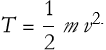
In Lesson 9’s "Energy Inequalities" section, we calculated kinetic energy as  . Let’s define a WL function to compute this for any mass and velocity, reusable for physics problems like motion analysis.
Step 1: Understand
Create a function to calculate kinetic energy given mass m and velocity v (in generic units). The function should output energy in generic units, useful for checking energy constraints.
Step 2: Translate
The expression for kinetic energy is,
(10.1)
Step 3: Plan
Define kE[m_, v_] to compute  , using SetDelayed to prevent evaluation until inputs are made (:=). Test with m = 2, v = 5, and apply to a list of velocities using Table. Use Head to check output type and ListPlot to visualize.
Step 4: Execute
Write the WL definition:

We can test this.


We can check the type of variable.


We cap apply this to a collection of velocities by writing a table.


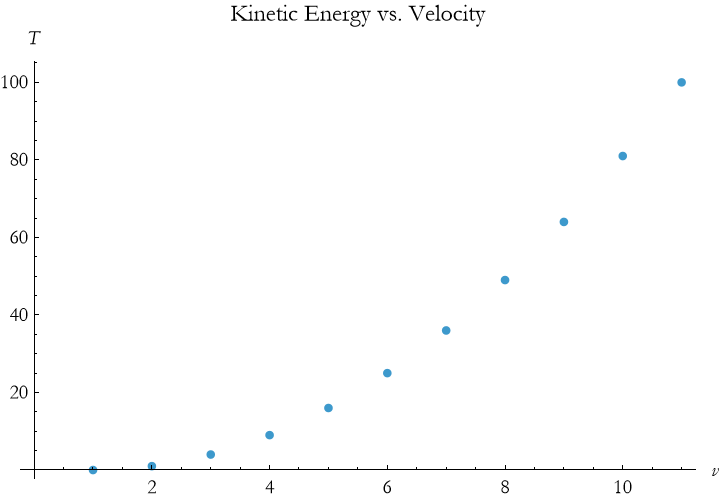
We can visualize this.

Step 5: Verify
For m=2 and v=5, the kinetic energy is 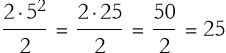 , this matches our output. We can test another case,
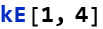

Since 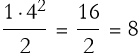 , this is also correct.
Step 6: Interpret
As velocity increases so does the kinetic energy. Our code works as desired and is reusable.
Function for Circuit Safety Check
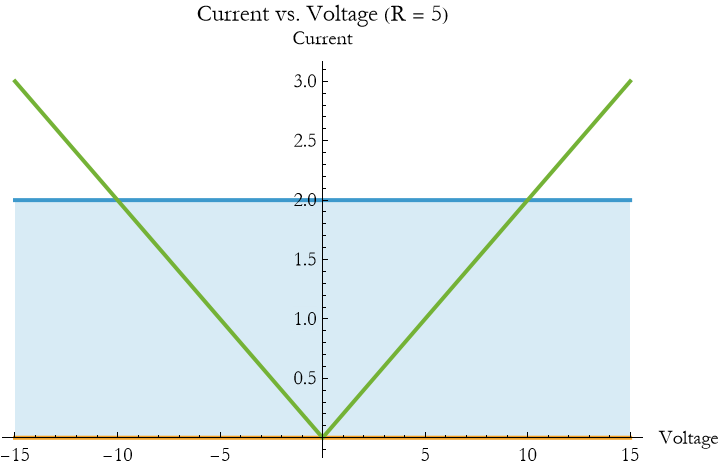
In Lesson 9’s “Electric Circuits,” we ensured a resistor’s current |I| < 2 A(with resistance R = 5 Ω) gives safe voltages|V| < 10 V. Let’s create a function to test if a voltage is safe for a given resistance, using conditionals.
Step 1: Understand
Create a function to input voltage V and resistance R (in generic units), compute current I = V / R, and check if |I| < 2. This automates circuit safety checks.
Step 2: Translate
Using

(10.2)
the safety condition is
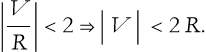
(10.3)
Use If to return “Safe” or “Unsafe.”
Step 3: Plan
Define cS[V_, R_,CL_] to compute |V| / R and check if it’s less than CL (the Current Limit). Test with V = 8 units, R = 5 units, and CL=2, then apply it to a set of resistances {4, 5, 6} with Table. Visualize with Plot.
Step 4: Execute
Write the WL definition:

We can test this.
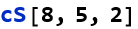

We can check the type of variable.


We can visualize this.

Step 5: Verify
For V = 8 and R = 5, |8| / 5 = 1.6 < 2, so “Safe” is correct. Test V = 12


Since |12|/5=2.4>2, this is also correct.
Step 6: Interpret
The cS function is able to check voltage safety for any specified inputs.
Terms and Definitions
Term/Definition 10.13 Function (in WL): A reusable named rule that takes inputs (arguments) and returns an output based on an expression; defined with := (SetDelayed).
Term/Definition 10.14 SetDelayed (symbol :=): The operator used to define functions; delays evaluation until the function is called with actual inputs.
Term/Definition 10.15 Argument (or input): A value passed to a function when called (e.g., m and v in KE[m, v]).
Term/Definition 10.16 Placeholder (underscore _): A symbol in function definition that stands for any input value (e.g., m means any value for m).
Assumptions (the implicit beliefs the author relies on)
Assumption 10.6: Functions make code reusable, readable, and easier to apply to physics problems (e.g., kinetic energy for any mass/speed).
Assumption 10.7: SetDelayed (:=) is the preferred way to define functions (delays evaluation until inputs are provided).
Assumption 10.8: Placeholders (_) allow functions to accept any value of the correct type.
Assumption 10.9: Functions can take multiple arguments (e.g., KE[m_, v_] takes mass and speed).
Assumption 10.10: WL automatically handles type checking and computation when inputs are provided.
Principles
Principle 10.12: Define functions to reuse calculations: name[input_] := expression.
Principle 10.13: Functions reduce repetition and errors — write once, apply many times.
Principle 10.14: Building functions is a core programming skill — essential for modeling complex physics systems.
Exercise 10.5: Begin with Term/Definition 10.13 and copy it into your notebook. Reflect on its meaning for a few minutes. Note any thoughts that come to mind. How would you explain this to someone sitting in front of you. Write this down. Then do this for each term/definition, assumption, and principal.
Exercise 10.6:
a) Create a function velocityFromKE(KE, m) that solves 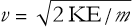 to find velocity given kinetic energy and mass. Test it with KE=50 J and m=5 kg
, and check if the result is approximately 4.47 m/s.
b) Write a function calculatePower(V, I) that computes power using P=V I. Test it with V=12 V and I=2 A, and verify the output is 24 W. Add a condition to ensure V and I are positive.
Control Structures
Aside from the most simple programs, you will come to a point where the behavior of the program changes depending on how the programs answers one or more questions. The kinds of commands that govern such behaviors are what we can call control structures—they control the behavior of the program.
If
The If statement in the Wolfram Language lets your program make decisions based on conditions. It checks whether a condition is true and performs one action if it is, or another if it isn’t. This is perfect for modeling physical systems where outcomes depend on quantities like position, velocity, or time. Here is the syntax.


Here, condition is a test (like x > 0), trueAction runs if the condition is true, and falseAction runs if it’s false. For example, suppose you’re tracking a particle’s velocity to determine its direction:


This code checks if velocity is positive. If true, it returns "Moving forward"; otherwise, it returns "Moving backward or stopped". You can use numbers, strings, or even calculations as actions. For instance, to classify a particle’s speed:


If speed is less than 5, the output is 0; otherwise, it’s twice the speed.
In physics—as we have seen—If statements help you handle scenarios like a ball hitting the ground or a pendulum swinging too far. You’ll see this in action when we model a particle’s motion and a pendulum’s swing. For now, try this: given a temperature in Celsius, convert it to Kelvin if it’s above absolute zero (-273.15°C), or warn if it’s not:


This returns 293.15 for 20°C, but "Invalid temperature" for, say, -300°C. The If statement ensures your program handles physical constraints logically.
You can also nest If statements for more complex decisions. For example, to categorize a particle’s energy:


This checks if energy exceeds 100 J, then 10 J, assigning "High", "Medium", or "Low" accordingly. Keep nested If statements simple to avoid confusion, especially when modeling motion or oscillations later.
For
The For statement in the Wolfram Language repeats a task a specific number of times, making it useful for tracking physical quantities like position or velocity over time. It’s ideal for simulating motion, such as a falling particle or a swinging pendulum, where you update values step by step.

Here, start sets an initial value (e.g., time t = 0), test checks if the loop continues (e.g., t <= 5), increment updates the counter (e.g., t += 0.1), and body is the code to run each time. For example, to calculate a particle’s position under constant velocity:



This starts at t = 0, runs while t is at most 1, increases t by 0.1 each step, and updates position using position += velocity dt. It prints the position at each step, showing how the particle moves.
You can store results in a list for plotting, which is handy for physics. Consider a car moving at 5 units of velocity for 3 units of time:

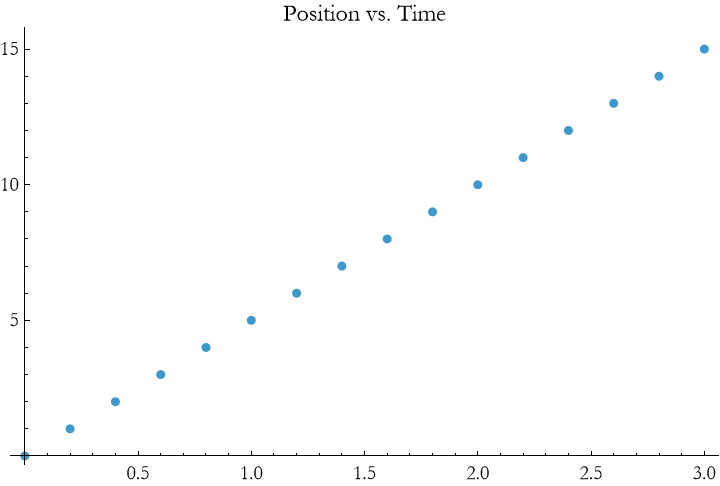
This program creates a loop that builds a list of {time, position} pairs and plots them, showing linear motion. The For statement lets you compute each step explicitly, which is great for understanding physics processes like a particle falling or a pendulum oscillating.
You can combine For with If to handle physical constraints. For example, stop a loop if a particle’s position becomes negative (like hitting the ground):
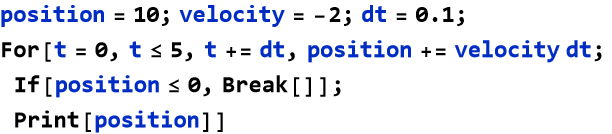



Here, the Break[] command stops the loop when position is at or below 0, mimicking a real-world boundary. You’ll see For loops in action when we model a particle’s motion under gravity and a pendulum’s swing.
While
The While statement in the Wolfram Language repeats a task as long as a condition remains true, making it useful for physics problems where you don’t know in advance how many steps are needed. For example, you might track a particle’s motion until it hits the ground or a pendulum until it slows significantly.

Here, test is a condition (e.g., position > 0), and body is the code to run while the condition holds. For instance, to update a particle’s position under constant velocity until it reaches a target:



This starts with position at 0, increases it by velocity dt each step, and stops when position reaches or exceeds 10, printing each position. Unlike For, While doesn’t use a fixed counter, so it’s flexible for physics scenarios with variable durations.
You can use While to collect data for visualization. Consider a rocket climbing with initial velocity 5 m  , decelerating at 1 m
  :
:
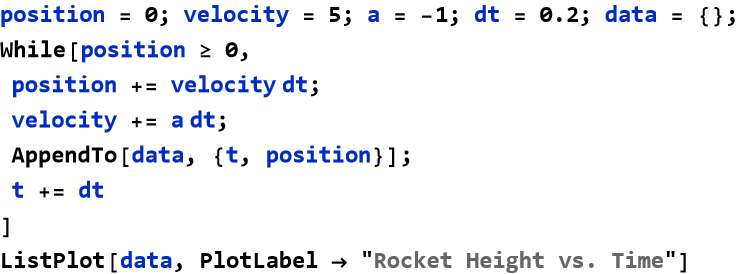
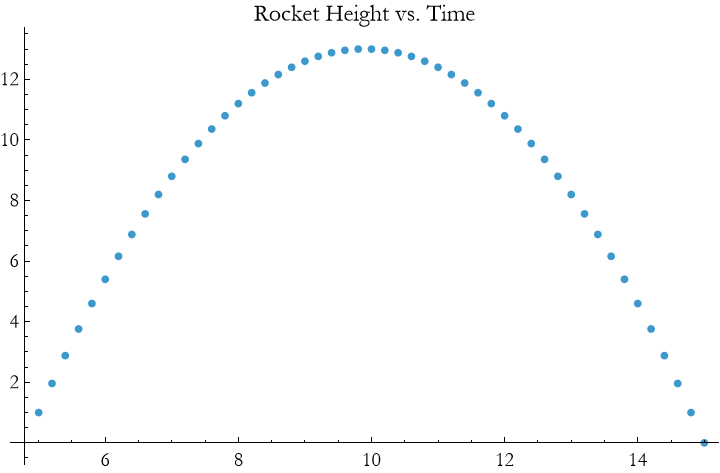
This loop updates position and velocity, stops when the rocket hits the ground (position < 0), and plots the height over time. You need to track time t manually, as shown.
Combining While with If adds realism. For example, stop a particle’s motion if it exceeds a speed limit:
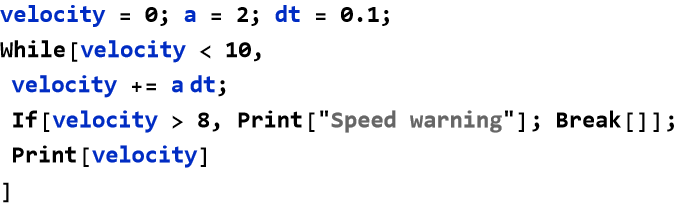



This accelerates a particle until velocity reaches 10 m  , but warns and stops early if it exceeds 8 m
  . You’ll use While loops to model a particle under gravity and a pendulum’s motion, adapting to physical conditions dynamically.
Do
The Do statement in the Wolfram Language repeats a task a fixed number of times, often seen as less flexible than For or While, but still useful for straightforward physics calculations where you know the number of steps in advance. Despite its reputation for being rigid, Do shines when you need to iterate over a range without managing a loop counter manually, such as computing positions or velocities at regular intervals.



Here, body is the code to run, i is the iterator (e.g., time), start and end set the range, and step is the increment. For example, to calculate a particle’s position under constant velocity (5 units) over 3 seconds:

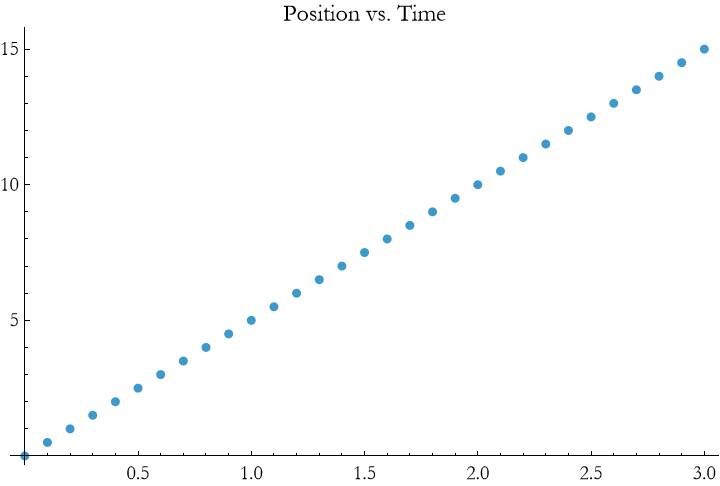
This iterates t from 0 to 3 in steps of 0.1, computes position as 5 t, stores each {t, position} pair in a list, and plots the linear motion. Unlike For, Do handles the iterator automatically, keeping the code clean.
You can combine Do with If for conditional checks. For example, track a particle’s velocity and flag high speeds:
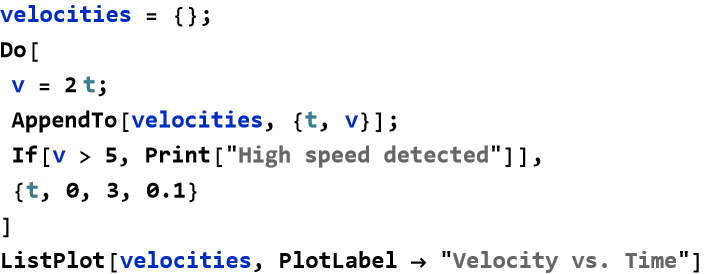





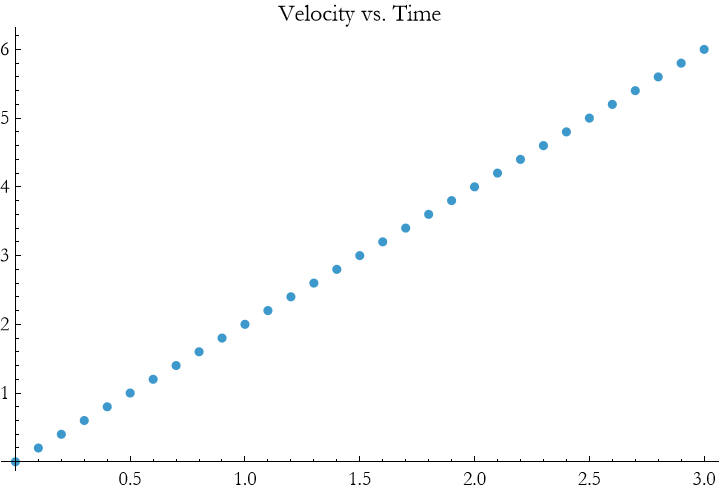
This iterates over time, computes velocity, and prints a warning if it exceeds 5 units. You’ll see Do in the particle and pendulum examples, where fixed steps simplify motion calculations.
Terms and Definitions
Term/Definition 10.17 Control structure: A programming construct that directs the flow of execution based on conditions, loops, or choices (e.g., If, For, While).
Term/Definition 10.16 If[] statement: A control structure that executes different code blocks depending on whether a condition is True or False; syntax: If[condition, trueAction, falseAction].
Term/Definition 10.17 Condition: An expression that evaluates to True or False (e.g., velocity > 0, energy > 100).
Term/Definition 10.18 For[] loop: A control structure that repeats a block of code a fixed number of times or over a range; syntax: For[start, test, increment, body].
Term/Definition 10.19 While[] loop: A control structure that repeats a block of code as long as a condition remains True; syntax: While[condition, body].
Term/Definition 10.20 Break[]: A command used inside loops to exit the loop immediately.
Term/Definition 10.21 Append[]: A function that adds an element to the end of a list (commonly used inside loops to collect results).
Term/Definition 10.22 List: A collection of elements in WL (e.g., {1, 2, 3}); used to store sequences like positions or velocities over time.
Term/Definition 10.23 ListPlot: A WL function that plots a list of points or values (e.g., position vs. time).
Assumptions (the implicit beliefs the author relies on)
Assumption 10.11: Loops are safe and terminate (e.g., fixed iterations in For, clear stopping condition in While).
Assumption 10.12: Lists are the natural way to collect data over time (e.g., positions, velocities, energies).
Assumption 10.13: Append[] is efficient for building lists inside loops (common pattern in simulations).
Assumption 10.14: Break[] is useful for early exit when a condition is met (e.g., velocity ≤ 0, position < 0).
Principles
Principle 10.15: Control structures direct program flow: If for decisions, For/While for repetition.
Exercise 10.7: Begin with Term/Definition 10.17 and copy it into your notebook. Reflect on its meaning for a few minutes. Note any thoughts that come to mind. How would you explain this to someone sitting in front of you. Write this down. Then do this for each term/definition, assumption, and principal.
Exercise 10.8:
a) Define a function velocity(t, v0, a) that calculates velocity using v(t)=v0+a t. Test it with v0=5 m  , a=−2 m
  , and t=3 sec, and check if the velocity is approximately 1 m
  .
.
b) Create a function isHighSpeed(v, threshold) that returns “High speed detected” if the velocity v exceeds a threshold (e.g., 10 m  ), otherwise returns “Safe speed”. Test it with v = 12 m
  and threshold = 10 m
  .
.
A Particle Under Constant Acceleration
The description of motion is called kinematics, and is a branch of a division of physics called mechanics. A particle under constant acceleration, like a ball falling under gravity, follows simple kinematic equations. If the acceleration is symbolized by a, initial velocity is symbolized by  , and initial position is symbolized by
  , the velocity and position at time t are:

(10.4)
and
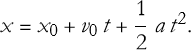
(10.5)
So, in this example, we’ll use Wolfram Language control structures to compute and visualize a particle’s motion, such as a ball dropped from 20 m with no initial velocity ( m,
m,  m
m  , a=−9.8 m
  ). We’ll stop the simulation when the ball hits the ground (x≤0) and plot its position over time.
A For loop lets us update position and velocity step by step, checking if the particle hits the ground. Let’s use a time step of 0.1 seconds:

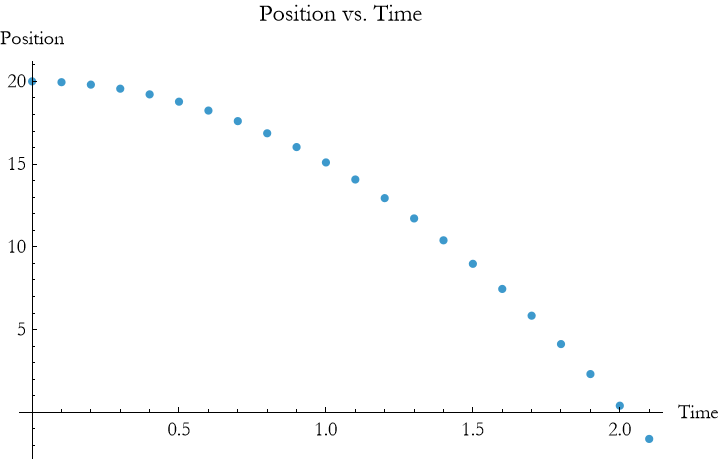
This code starts at t=0, computes position and velocity using the kinematic equations, and stops when x ≤ 0 using If and Break[]. The ListPlot shows a parabolic curve, reflecting the quadratic term in the position equation.
A While loop is ideal when we focus on the condition for stopping (e.g., hitting the ground). Here’s the same problem:
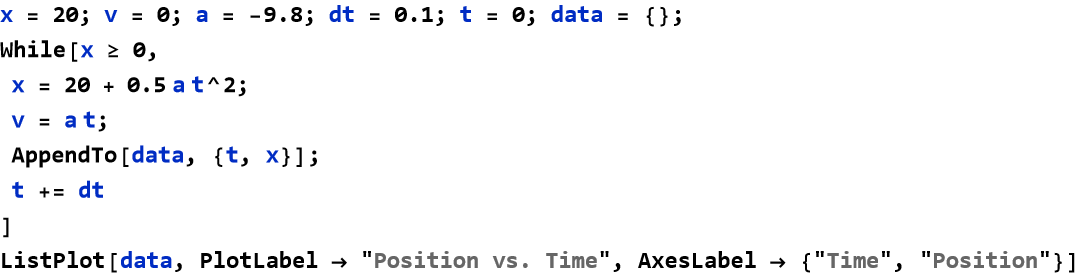
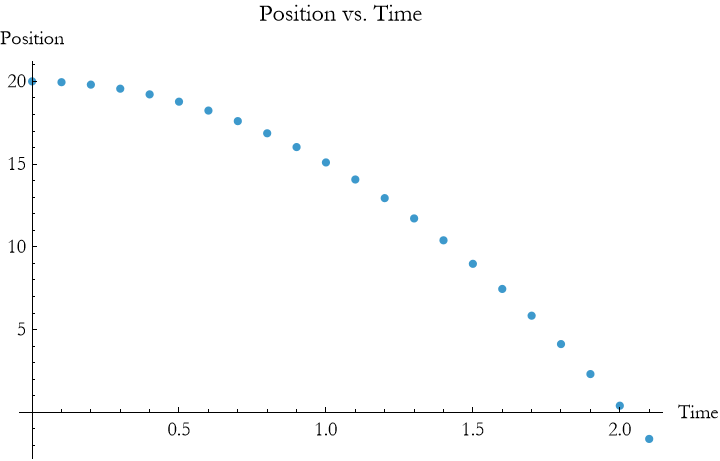
This loop runs while x ≥ 0, updating position and time manually. The result is similar to the For loop, but While emphasizes the physical boundary.
A Do loop works if we know the time range (e.g., 2 seconds, enough for the ball to hit the ground). It’s simpler but less flexible:
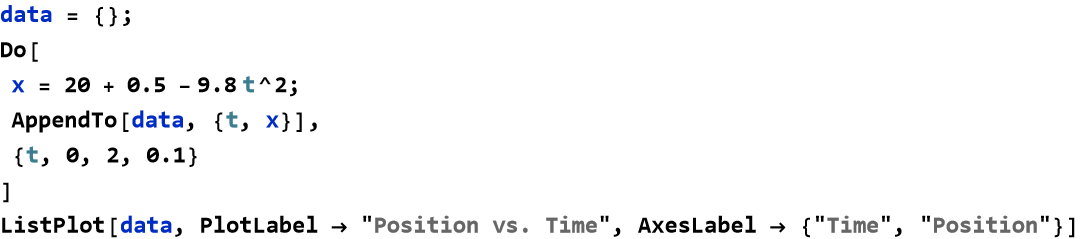
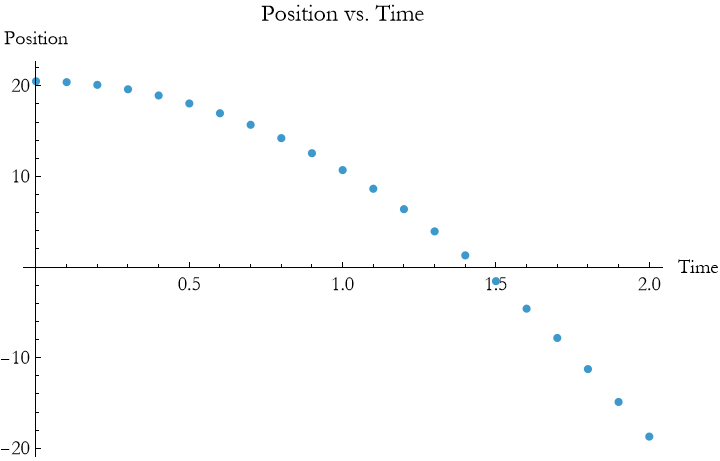
This computes position over fixed steps. If the particle hits the ground early, extra points may show negative positions, so For or While are often better for realistic stopping conditions.
The plots show a parabola because position depends on  . The ball reaches the ground when
  , or t≈2.02 seconds. Try changing a,
  , or
, or  (e.g.,
  for an upward throw) to see how the motion changes. Control structures make these simulations flexible, letting you model real-world scenarios like a rocket landing or a car accelerating.
Terms and Definitions
Term/Definition 10.24 Kinematics: The branch of physics that describes motion (position, velocity, acceleration) without considering its cause.
Term/Definition 10.25 Mechanics: The broader field of physics that studies motion; kinematics is one division.
Term/Definition 10.26 Velocity (symbol v): The rate of change of position with time; includes direction (can be positive or negative); SI unit m/s.
Term/Definition 10.27 Initial velocity (symbol  ): The velocity at time t = 0 (starting velocity).
Term/Definition 10.28 Acceleration (symbol a): The rate of change of velocity with time; constant in this context (e.g., g due to gravity); SI unit m/s .
.
Term/Definition 10.29 Position (symbol x or x(t)): The location of the particle at time t; SI unit meters (m).
Term/Definition 10.30 Initial position (symbol  ): The position at time t = 0.
Term/Definition 10.31 Time (symbol t): The elapsed time since the start of motion; SI unit seconds (s).
Term/Definition 10.32 Gravitational acceleration (symbol g): Constant downward acceleration near Earth’s surface; approximately -9.8 m/s (negative for downward).
Term/Definition 10.33 Kinematic equations: The standard set of equations for constant acceleration motion (e.g.,  ).
).
Assumptions (the implicit beliefs the author relies on)
Assumption 10.15: Acceleration is constant in this kind of motion (e.g., g ≈ -9.8 m/s for free fall near Earth).
Assumption 10.16: No air resistance or other forces act (here we treat only idealized motion).
Assumption 10.17: Motion is one-dimensional (vertical only) in these examples.
Assumption 10.18: Time t starts at 0 when motion begins (e.g., release or launch).
Assumption 10.19: Negative acceleration (g negative) indicates downward direction.
Principles
Principle 10.16: Key kinematic equations for constant a: 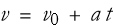 ,
,  .
.
Principle 10.17: Use loops (For or While) to simulate motion step-by-step: update velocity and position with dt (time step).
Principle 10.18: Stop simulation when physical boundary is reached (e.g., x ≤ 0 for ground hit) using If and Break[].
Principle 10.19: Choose small dt (e.g., 0.1 s) for smooth, accurate simulation.
Exercise 10.9: Begin with Term/Definition 10.24 and copy it into your notebook. Reflect on its meaning for a few minutes. Note any thoughts that come to mind. How would you explain this to someone sitting in front of you. Write this down. Then do this for each term/definition, assumption, and principal.
Exercise 10.10:
a) Modify the free fall code to account for a variable gravitational acceleration (e.g., decreasing with height). Use a For loop to plot position vs. time, assuming g=9.8−0.001h where h is height. Hint: Update a inside the loop and adjust the step size. Interpret the result.
b) Write a While loop to simulate a projectile’s motion with a simple air resistance term (e.g., a=−9.8−0.1v, where v is velocity). Plot the trajectory and stop when it hits the ground. Hint: Use AppendTo for data and check x≤0. Explain what is going on here.
c) Create a Do loop to simulate a ball dropped from 20 m with a 0.8 rebound coefficient (velocity reverses with 80% magnitude). Plot position over multiple bounces until it settles. Hint: Use a conditional to reverse v and reduce it.
d) Use a For loop to model a rocket’s ascent where acceleration increases by 0.5 m  every second due to fuel burn, starting from rest. Plot height vs. time for 10 seconds. Hint: Increment a and use
  .
.
e) Use a Do loop to simulate a car accelerating at 2 m  with a maximum speed limit of 20 m
  . Plot velocity vs. time and stop when the limit is reached. Hint: Adjust v conditionally and use AppendTo for data.
Programming Paradigms
Programming paradigms are different ways to approach writing code. In the Wolfram Language, you can use multiple paradigms, giving you flexibility to tackle problems in ways that suit your needs. You can even mix and match these paradigms, which is almost unique.
Think of a paradigm as a mindset. To calculate a particle’s motion, you might:
Step through calculations one by one, updating position and velocity.
Define reusable procedures to organize your steps.
Transform data without changing variables.
Apply rules to rewrite expressions.
Break your program into independent parts.
Below, we will explore five of the paradigms you can use in WL:
Imperative Programming: Give step-by-step instructions, like updating a particle’s position with position = position + velocity dt. It’s direct and intuitive.
Procedural Programming: Group imperative steps into procedures, making code reusable, like a command to compute motion for any initial conditions.
Functional Programming: Treat calculations as transformations, avoiding variable updates, such as mapping a velocity over time points.
Rule-Based Programming: Use patterns and rules to rewrite expressions, like transforming physics equations symbolically.
Modular Programming: Organize code into separate units, like modules for different parts of a simulation, keeping your program tidy and maintainable.
Each paradigm has strengths for physics applications. For example, imperative programming is great for simulating a ball’s fall step by step, while functional programming simplifies plotting a pendulum’s motion. You’ll see how these approaches, combined with control structures, let you model real-world systems in the examples ahead.
Imperative Programming
Imperative programming is like solving a physics problem by hand; you give the computer a sequence of steps to follow, updating values as you go. In the Wolfram Language, this means assigning variables, performing calculations, and directing the program’s flow to model systems like a moving particle or a pendulum’s swing. It’s a direct approach, ideal for simulating physical processes.
For example, to track a particle moving at constant velocity (4 m  ) for 3 seconds, you can update its position step by step:
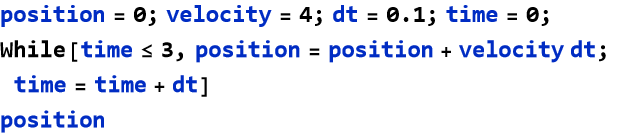

This code starts with position and time at 0, adds velocity dt to position during each 0.1-second step, and stops after 3 seconds. The final position is 12.4 m (position=velocity×time). You control every step, mirroring how you’d calculate motion manually.
Imperative programming in the Wolfram Language relies on:
Assignments: Set and update variables, like position = position + velocity dt.
Sequential Steps: Commands execute in order, ensuring clear outcomes.
Control Flow: Use structures like loops and conditions (covered next) to manage simulations.
In physics, this approach excels at breaking down problems. To model a falling object, you’d update velocity and position each step, checking for ground impact. Later, you’ll use imperative programming to simulate a particle’s acceleration and a pendulum’s oscillation.
Terms and Definitions
Term/Definition 10.34 Imperative programming: A programming style where the computer follows a sequence of steps to update values and model processes, similar to solving physics problems by hand.
Term/Definition 10.35 Sequential steps: The principle that commands in imperative code execute in the order written, ensuring predictable outcomes.
Term/Definition 10.36 Control flow: The use of structures like loops and conditions to direct the program's execution (e.g., repeat until a condition is met).
Assumptions (the implicit beliefs the author relies on)
Assumption 10.20: Wolfram Language supports imperative constructs (assignments, While loops) effectively for physics modeling.
Assumption 10.21: Variables hold state (position, velocity, time) that updates over iterations.
Principles
Principle 10.20: Imperative code uses a sequence of steps to model dynamic systems (e.g., updating position = position + velocity dt).
Principle 10.21: Assignments update variable state — essential for simulating change over time.
Principle 10.22: Sequential execution ensures code runs in a logical, predictable order.
Exercise 10.11: Begin with Term/Definition 10.24 and copy it into your notebook. Reflect on its meaning for a few minutes. Note any thoughts that come to mind. How would you explain this to someone sitting in front of you. Write this down. Then do this for each term/definition, assumption, and principal.
Exercise 10.12:
a) Write a While loop to simulate a particle moving at a constant velocity of 5 m  starting from position 0 m. Update the position in steps of dt = 0.1 s, but stop when the particle reaches or exceeds 20 m instead of a time limit. Output the final time taken. Hint: Initialize time = 0 and position = 0, then increment time by dt inside the loop while checking position ≤ 20 m.
b) Use sequential assignments (without a loop) to calculate the position of a particle accelerating at 2 m  from rest over 5 discrete time steps of 1 s each. Compute and print velocity and position after each step. Hint: Start with v = 0 and x = 0, then for each step: v = v + a dt (using the updated v).
c) Implement a Do loop to model an object falling from 50 m with acceleration g = 9.8 m  and initial velocity 0 m
  . Use dt = 0.5 s, update velocity and position each iteration, and stop early if position ≤ 0 m. Output the impact time. Hint: Use a fixed number of iterations (e.g., 20), but add a Break[] if x ≤ 0 after updating x = x + v dt + 0.5 a dt².
d) Use a While loop to model a sliding object’s velocity decreasing due to friction (a = -0.5 m  ) from an initial 10 m
  . Update velocity in dt = 0.2 s steps until it reaches 0 or below, then output the stopping time and distance traveled. Hint: Track position as well with x = x + v dt, and check v > 0 in the loop condition. Context: Applies to real-world deceleration, such as an object slowing on a rough surface.
e) Use a Do loop to simulate a car accelerating at 2 m  with a maximum speed limit of 20 m
  . Plot velocity vs. time and stop when the limit is reached. Hint: Adjust v conditionally and use AppendTo for data.
Procedural Programming
Procedural programming builds on imperative programming by organizing step-by-step instructions into reusable blocks called procedures or functions. In the Wolfram Language, this means creating named functions that take inputs, perform calculations, and return results, making it easier to model physics problems like motion or oscillations. Procedural programming simplifies complex tasks by breaking them into manageable, reusable pieces.
For example, to calculate a particle’s position under constant velocity, you can define a procedure:

This function takes velocity and time as inputs and returns their product. To compute the position of a particle moving at 4 units after 3 seconds:


The result is 12 m of distance. Unlike imperative programming, where you manually update variables step by step, this procedure is concise and reusable for any velocity or time.
Procedural programming in the Wolfram Language emphasizes:
Functions: Define reusable code blocks, like f[x_] :=  , to compute values.
Modularity: Break problems into procedures, each handling a specific task.
Control Flow: Use loops and conditions (covered later) within functions.
In physics, procedures streamline simulations. For a falling object, you might define a function to compute position under constant acceleration:

This can compute the position of a ball dropped from 20 meters (x0=20, v0=0, a=−9.8) at t=2:


The result is 0.4 m of distance, showing the ball’s height after 2 seconds. You’ll use similar functions to model a particle’s motion and a pendulum’s swing later.
Procedural programming’s reusable functions make your physics code clearer and more efficient.
Terms and Definitions
Term/Definition 10.37 Procedural programming: A programming style that organizes imperative step-by-step instructions into reusable blocks called procedures or functions.
Term/Definition 10.38 Procedure (or function): A named, reusable block of code that takes inputs, performs calculations, and returns results.
Term/Definition 10.39 Modularity: The practice of breaking complex problems into manageable, reusable procedures.
Assumptions (the implicit beliefs the author relies on)
Assumption 10.22: Procedural programming builds on imperative style by adding reusability through named functions.
Assumption 10.23: Wolfram Language supports procedural programming with named functions using := (SetDelayed).
Principles
Principle 10.23: Functions take arguments (placeholders with _) and compute/return results.
Principle 10.24: Functions make code clearer and more efficient — avoid repeating calculations.
Exercise 10.13: Begin with Term/Definition 10.37 and copy it into your notebook. Reflect on its meaning for a few minutes. Note any thoughts that come to mind. How would you explain this to someone sitting in front of you. Write this down. Then do this for each term/definition, assumption, and principal.
Exercise 10.14:
a) Define a function velocitySimulator[v0_, dt_, totalTime_] that takes initial velocity, time step, and total time as inputs. Use a While loop inside to generate and return a list of positions at each time step, starting from position 0. Hint: Initialize time and position, append positions to a list, and update sequentially until time exceeds totalTime. Context: Models uniform motion, such as a car cruising at constant speed, allowing reuse for different velocities or durations.
b) Create a function fallTime[x0_, a_, dt_] that computes the time for an object to fall from initial height x0 under acceleration a (e.g., -9.8 m  ), using a Do loop with a fixed max iterations (e.g., 100) and Break[] on ground impact. Return the impact time. Hint: Update velocity and position each step; check if position <= 0 to break. Context: Useful for gravitational drop problems, like estimating time for objects falling from various heights.
c) Define a function acceleratedPositions[x0_, v0_, a_, dt_, steps_] that returns a list of positions over a given number of steps for uniformly accelerated motion. Use sequential assignments in a For loop to update and collect positions. Hint: Start with current x and v; in each iteration, update v = v + a dt, then x = x + v dt. Context: Applies to scenarios like a sled accelerating down a slope, reusable for different initial conditions.
d) Write a function decelerationStop[v0_, a_, dt_] that simulates an object slowing from initial velocity v0 under constant deceleration a (<0) using a While loop. Return the stopping time and final distance traveled. Hint: Update velocity and position until v ≤ 0; track time incrementally. Context: Models friction-based stopping, such as a block sliding to rest on a rough surface.
Pure Functions
Pure functions in the Wolfram Language are a cornerstone of functional programming, letting you define operations without naming them or modifying variables. They take inputs, produce outputs, and avoid side effects.
A pure function has the form  & or 2 # &, where # represents the input and & marks the function’s end. For example, to square a number:


As you can see this returns 9. The function  & squares its input without needing a named variable. To compute the positions for a particle moving at constant velocity (5 m
  ) over times 0 to 3 seconds:


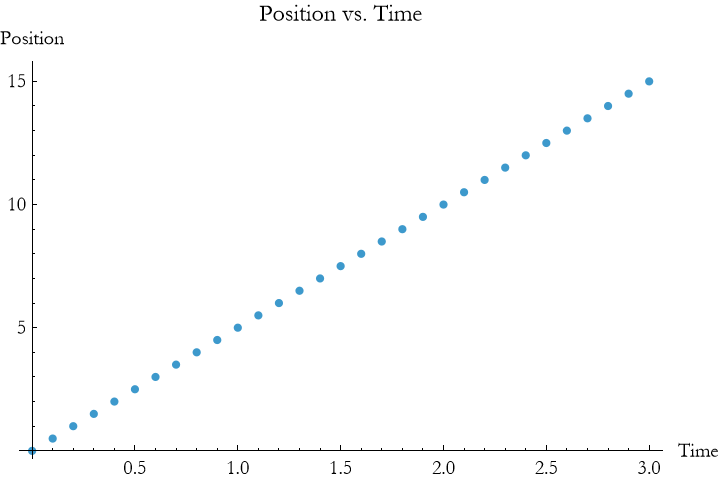
Here, 5 # & multiplies each time input by 5, producing a list of positions. Map applies the pure function to every element, creating a linear trajectory without updating variables, unlike imperative programming.
Pure functions are powerful for physics simulations. For a falling object with position 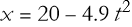 , use a pure function to compute positions:


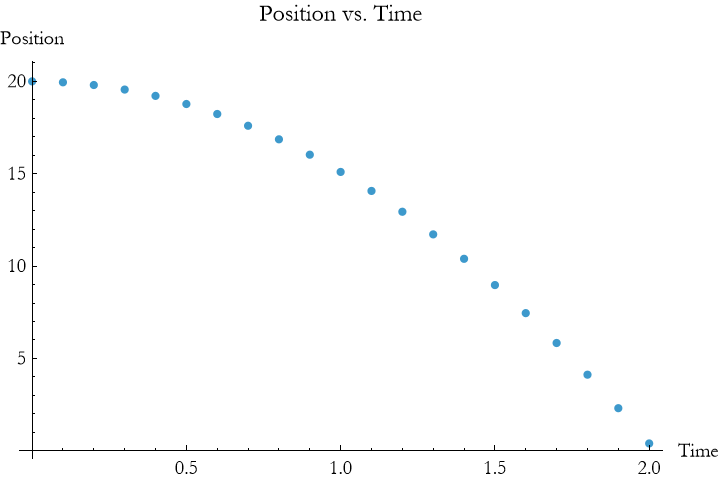
This applies 20 - 4.9  & to each time, producing a parabolic curve in one step. Pure functions avoid loops, making your code concise and mathematical.
Key features of pure functions include:
Anonymity: No need to name the function, like  &.
&.
No Side Effects: They don’t change variables, ensuring predictable results.
Terms and Definitions
Term/Definition 10.40 Pure function: A function that takes inputs, produces an output, and has no side effects (does not modify variables, global state, or perform I/O); in WL, typically written with # (slot) and & (pure function marker).
Term/Definition 10.41 Slot (symbol #): A placeholder in a pure function that represents the input argument (e.g.,  & squares its input).
Term/Definition 10.42 Pure function marker (symbol &): Marks the end of a pure function definition (e.g.,  & is the pure function that squares its input).
Term/Definition 10.43 Map[] (Wolfram Language function): Applies a function (pure or named) to every element of a list, returning a new list of results.
Term/Definition 10.44 Range[] (Wolfram Language function): Generates a list of numbers in a specified sequence (e.g., Range[0, 3, 0.1] → {0, 0.1, 0.2, ..., 3}).
Term/Definition 10.45 Transpose[] (Wolfram Language function): Transposes a list of lists (e.g., turns {{t1, x1}, {t2, x2}} into {{t1, t2}, {x1, x2}} for plotting).
Assumptions (the implicit beliefs the author relies on)
Assumption 10.24: Pure functions are a core feature of functional programming and are especially powerful in Wolfram Language.
Assumption 10.25: Pure functions have no side effects — they only compute output from input, making them predictable and safe.
Assumption 10.26: The slot (#) and & marker are the standard, concise way to write pure functions in WL.
Principles
Principle 10.25: Pure functions are powerful, concise, and elegant — a key strength of Wolfram Language for theoretical physics.
Exercise 10.15: Begin with Term/Definition 10.40 and copy it into your notebook. Reflect on its meaning for a few minutes. Note any thoughts that come to mind. How would you explain this to someone sitting in front of you. Write this down. Then do this for each term/definition, assumption, and principal.
Exercise 10.16:
a) Define a pure function to compute a list of positions for an object moving at a constant velocity of 6 m  over a time range from 0 to 5 seconds with a step of 0.5 s. Use Map with Range to generate the list and plot it. Hint: Use # & with the formula 6 # and ListPlot. Context: Models a car traveling at steady speed, showcasing pure function simplicity for linear motion.
b) Create a pure function to calculate the heights of an object launched upward at 10 m  under a constant deceleration of 1 m
  (e.g., air resistance) over 0 to 10 seconds with a 1 s step. Use Map and plot the results. Hint: Apply # 10 - 0.5 #^2 & to Range[0, 10]. Context: Simulates a rocket ascent with drag, highlighting parabolic decay without variable updates.
c) Define a pure function to determine the distances traveled by a boat moving at 3 m  relative to water, with a current adding 1 m
  , over time steps from 0 to 4 s with 0.5 s intervals. Use Map to compute and return the list. Hint: Use # (3 + 1) & with Range[0, 4, 0.5]. Context: Models downstream motion, illustrating additive effects in a fluid environment.
d) Create a pure function to compute the positions of a passenger in an elevator accelerating at 2 m  from rest over 0 to 3 seconds with 0.25 s steps. Use Map and plot the positions. Hint: Apply 0.5 #^2 2 & to Range[0, 3, 0.25]. Context: Represents vertical motion in a controlled acceleration scenario, like an elevator start.
e) Define a pure function to calculate the distances a ball rolls down an incline with effective acceleration of 3 m  over 0 to 2 seconds with 0.2 s steps. Use Map to generate the list and visualize with ListPlot. Hint: Use 0.5 #^2 3 & with Range[0, 2, 0.2]. Context: Models gravitational motion on a slope, avoiding complex dynamics like friction limits.
f) Create a pure function to compute the positions of an object moving horizontally at 4 m  with a wind boost of 0.5 m
  acceleration over 0 to 6 seconds with 0.5 s steps. Use Map and plot the trajectory. Hint: Apply # 4 + 0.5 #^2 0.5 & to Range[0, 6, 0.5]. Context: Simulates a glider or cart aided by wind, emphasizing combined motion effects.
Functional Programming
Functional programming treats calculations as transformations of data, like applying a physics formula directly to inputs without changing variables. In the Wolfram Language, this means using functions to process data in a single step, ideal for problems like plotting a particle’s trajectory or a pendulum’s oscillation. Functional programming feels like streamlined math, avoiding the step-by-step updates of imperative programming.
For example, to compute a particle’s positions under constant velocity (5 m  ) over times 0 to 3 seconds, you can use a functional approach:


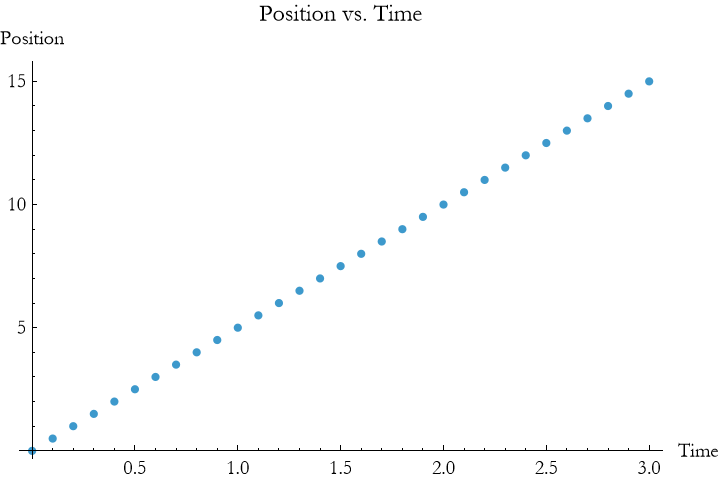
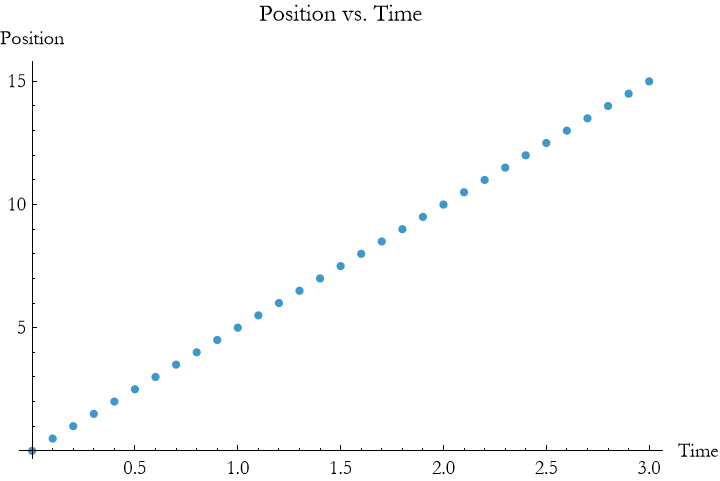
Here, # 5 & is a pure function that multiplies each time by 5. Map applies it to every element in times, producing positions from 0 to 15 meters in one step. The ListPlot shows a linear trajectory, all without modifying variables. Note that instead of typing Map you can use the shortcut /@.


Functional programming in the Wolfram Language emphasizes:
Pure Functions : Anonymous functions like  &, covered in detail later, transform inputs without side effects.
List Operations: Tools like /@ and Table process data sets efficiently, common in physics.
Immutability: Avoid changing variables, keeping code predictable and concise.
Terms and Definitions
Term/Definition 10.46 Functional programming: A programming style that treats computations as transformations of data, using functions to process inputs and produce outputs without modifying variables or state (avoids side effects).
Term/Definition 10.47 Map (Wolfram Language function): Applies a function (named or pure) to every element of a list, returning a new list of results.
Term/Definition 10.48 /@ (or Map operator): A shorthand for Map; applies a function to each element of a list (e.g., f /@ list = Map[f, list]).
Term/Definition 10.49 Side effects: Changes to variables, global state, or external output (e.g., Print, modifying variables); functional programming avoids them.
Term/Definition 10.50 Immutability: The principle that data (variables, lists) is not changed after creation; new values are produced instead.
Assumptions (the implicit beliefs the author relies on)
Assumption 10.27: Map (or /@) is the natural way to apply functions to lists (e.g., positions over time steps).
Principles
Principle 10.26: Functional programming treats calculations as transformations of data — apply functions directly to inputs.
Exercise 10.17: Begin with Term/Definition 10.46 and copy it into your notebook. Reflect on its meaning for a few minutes. Note any thoughts that come to mind. How would you explain this to someone sitting in front of you. Write this down. Then do this for each term/definition, assumption, and principal.
Exercise 10.18:
a) Define a pure function to compute the distances traveled by an object moving at 8 m  over a time range from 0 to 6 seconds with a 0.5 sec step. Use Map with Range and plot the results. Hint: Apply 8 # & to Range[0, 6, 0.5] and use ListPlot. Context: Models a train moving at a steady speed along a straight track, showcasing functional simplicity.
b) Create a pure function to calculate the heights of an object dropped from 30 m with a constant deceleration of 0.2 m  (e.g., air resistance) over 0 to 5 seconds with a 0.5 sec step. Use Map and plot the trajectory. Hint: Use 30 - 0.1 #^2 0.2 & with Range[0, 5, 0.5]. Context: Simulates a parachute descent, illustrating height reduction with drag effects.
c) Define a pure function to determine the distances traveled by a boat moving at 5 m  against a current subtracting 1 m
  over 0 to 4 seconds with 0.25 sec intervals. Use Map to generate the list. Hint: Apply 5 # - # & (net velocity 4 m
  ) to Range[0, 4, 0.25]. Context: Models upstream motion in a river, emphasizing relative velocity in fluid dynamics.
d) Create a pure function to compute the positions of a passenger in an elevator decelerating at 1.5 m  from an initial speed-equivalent distance over 0 to 2 seconds with 0.2 sec steps. Assume initial “velocity distance” of 3 m. Use Map and plot. Hint: Apply 3 - 0.5 #^2 1.5 & to Range[0, 2, 0.2]. Context: Represents a controlled stop in an elevator, focusing on deceleration dynamics.
e) Define a pure function to calculate the distances a ball rolls with a constant velocity of 2 m  plus an acceleration of 0.5 m sec^-2 over 0 to 3 seconds with 0.3 sec steps. Use Map and ListPlot. Hint: Use 2 # + 0.5 #^2 0.5 & with Range[0, 3, 0.3]. Context: Models a ball rolling with initial push and slight incline effect, avoiding complex friction.
f) Create a pure function to compute the positions of an object moving at 3 m  with a wind resistance causing a 0.3 m
  deceleration over 0 to 5 seconds with 0.5 sec steps. Use Map and plot. Hint: Apply 3 # - 0.5 #^2 0.3 & to Range[0, 5, 0.5]. Context: Simulates a cart moving against wind, highlighting combined motion with resistive forces.
Rule-Based Programming
Rule-based programming in the Wolfram Language uses patterns and rules to transform expressions, like rewriting physics equations to solve problems. Instead of step-by-step updates (imperative) or function applications (functional), you define rules to replace parts of an expression, making it ideal for symbolic calculations in physics, such as simplifying motion equations or analyzing pendulum dynamics. Rule-based programming feels like automating algebra with clear instructions.
We have used some patterns already, but here is how they work in general. A rule has the form pattern -> replacement. For example, to convert a velocity expression into a position under constant velocity:
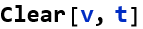


This applies the rule v -> 5 to the expression v t, replacing v with 5 to yield 5 t. For a list of times, you can compute positions:


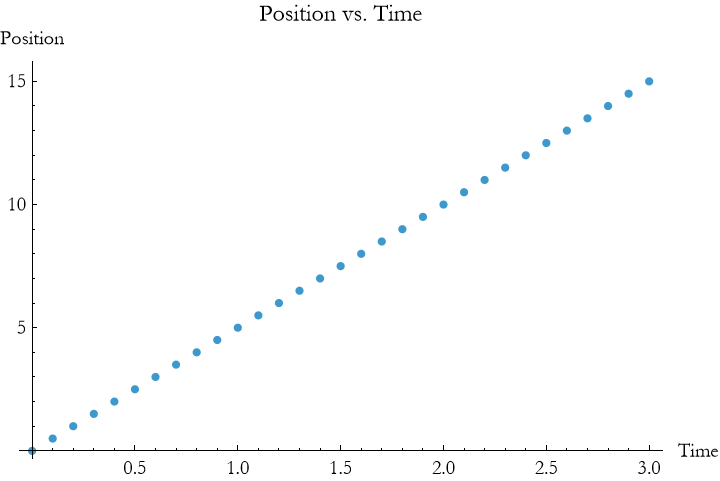
Here, the rule {v -> 5, t -> #} substitutes v with 5 and t with each time value, producing positions from 0 to 15 meters. The pure function and /@ (from functional programming) apply the rule across the list, plotting a linear trajectory.
Rule-based programming shines in symbolic physics. For a falling object with position x = x0 + v0 t+0.5 a  , apply rules to set initial conditions:

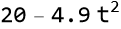

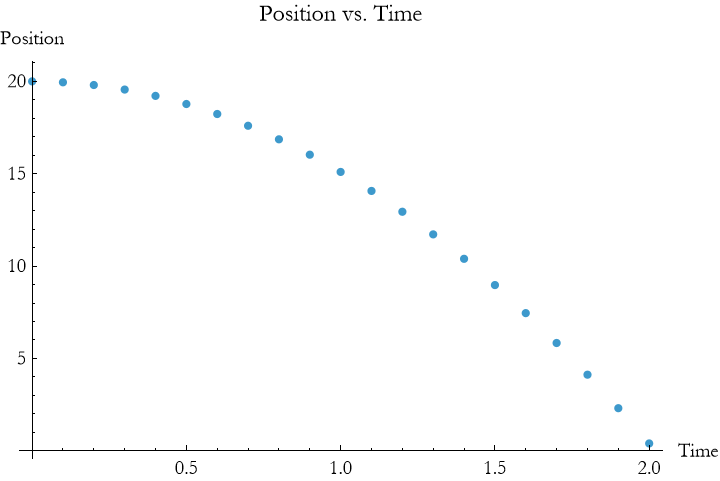
This substitutes x0=20, v0=0, a=−9.8 into the expression, then evaluates it for each time, producing a parabolic curve. Rules let you manipulate equations flexibly without hard-coding values early.
Key features of rule-based programming include:
Patterns: Match parts of expressions, like v t or  .
.
Rules: Transform matched parts, like v -> 5.
Symbolic Power: Handle general expressions, perfect for physics derivations.
Terms and Definitions
Term/Definition 10.51 Rule-based programming (or transformational programming): A programming style in Wolfram Language that uses patterns and rules to transform or rewrite expressions (e.g., replacing parts of an equation or expression automatically).
Term/Definition 10.52 Rule (symbol →): A transformation pattern of the form pattern → replacement; applied to expressions to substitute or rewrite matched parts.
Term/Definition 10.53 Pattern: A template that matches parts of an expression (e.g., v for any value, t for time variable).
Term/Definition 10.54 Replacement rule application (/. or ReplaceAll): The operator that applies rules to an expression, substituting matches (e.g., vt /. v → 5).
Assumptions (the implicit beliefs the author relies on)
Assumption 10.28: Rule-based programming is a powerful, symbolic way to manipulate physics equations and expressions.
Assumption 10.29: Wolfram Language handles rule application (/. or ReplaceAll) efficiently on symbolic expressions.
Principles
Principle 10.27: Rule-based programming transforms expressions using patterns → replacements (e.g., vt /. v → 5 → 5t).
Principle 10.28: Use /. (ReplaceAll) to apply rules to expressions or lists.
Principle 10.29: Combine rules with Map /@ to apply transformations to every element of a list (e.g., positions over times).
Exercise 10.19: Begin with Term/Definition 10.51 and copy it into your notebook. Reflect on its meaning for a few minutes. Note any thoughts that come to mind. How would you explain this to someone sitting in front of you. Write this down. Then do this for each term/definition, assumption, and principal.
Exercise 10.20:
a) Define a rule to transform a velocity expression v t into a position under constant acceleration  , where x0 = 10 m, v = 2 m
  , and a=3 m
  . Use Range with time steps from 0 to 4 sec (0.5 sec steps) and apply the rule to compute and plot positions. Hint: Use v t /. {v -> 2, t -> #, a -> 3} + 10 + 0.5 3 #^2 & with Map. Context: Models a car accelerating on a straight road, showcasing rule-based position updates.
b) Create a rule to convert a velocity expression v t into a distance with deceleration  , where x0=0, v=6 m
  , and b=1 m
  . Apply it over 0 to 6 sec with 0.5 sec steps and plot the result. Hint: Use v t /. {v -> 6, t -> #, b -> 1} - 0.5 1 #^2 & with Map. Context: Simulates a vehicle slowing down, like braking on a flat surface.
c) Define a rule to transform  into a height expression
  , with h0 = 15 m, v0 = 5 m
  , and g = 9.8 m
  . Use Range from 0 to 2 sec (with 0.2 sec steps) and plot the heights. Hint: Apply v_0 t /. {v_0 -> 5, t -> #, g -> 9.8} + 15 - 0.5 9.8 #^2 & with Map. Context: Models a ball thrown upward, focusing on gravitational effects without ground impact.
d) Create a rule to convert v t into a distance along an incline  , where x0 = 0 m, v = 0 m
  , a = 2 m
  (net acceleration), over 0 to 3 sec with 0.3 sec steps. Plot the distances. Hint: Use v t /. {v -> 0, t -> #, a -> 2} + 0.5 2 #^2 & with Map. Context: Represents a block sliding down a friction-adjusted incline, emphasizing rule-based dynamics.
e) Define a rule to transform v t into a position  , where x0 =0 m, v = 4 m
  , and w = 0.5 m
  (wind acceleration), over 0 to 5 sec with 0.5 sec steps. Use Map and plot. Hint: Apply v t /. {v -> 4, t -> #, w -> 0.5} + 0.5 0.5 #^2 &. Context: Models a glider aided by wind, focusing on enhanced motion without resistance limits.
f) Create a rule to convert v t into a height  , with h0 = 25 m, v = −2 m
  (downward), and g = 9.8 m
  , over 0 to 2.5 sec with 0.25 sec steps. Plot the heights. Hint: Use v t /. {v -> -2, t -> #, g -> 9.8} + 25 - 0.5 9.8 #^2 & with Map. Context: Simulates a dropped object with initial downward velocity, like a weighted ball, using rule-based height tracking.
Modular Programming
Modular programming organizes code into independent, reusable units called modules, making it easier to manage complicated physics simulations. In the Wolfram Language, modules collect related calculations, keeping your program clear and maintainable. Modules are like toolkits, each handling a specific task, such as computing positions or plotting trajectories.
A concept that might be new to you is scoping. Scoping determines where a variable exists and can be used in your code. Scoping ensures variables stay where they belong. In the Wolfram Language, there are two main types of scoping:
Global Scoping: Variables defined outside modules (e.g., x = 5) are accessible everywhere, which can lead to unintended changes.
Local Scoping: Variables defined inside a module exist only within it, preventing conflicts with other code.
Modules use local scoping to keep variables private, making your code safer and clearer. For example, a module can define a local position variable without affecting a global position used elsewhere.
A module in the Wolfram Language uses Module[{variables}, body] to define local variables and operations. For example, to compute a particle’s position under constant velocity (5 m  ) for a given time:


This module creates a local variable pos, computes the product velocity time, and returns 15 m  . The pos variable is private to the module, thanks to local scoping, so it won’t interfere with other variables named pos in your program.
Modules are powerful for physics. For a falling object with position x = x0 + v0 t+0.5 a 

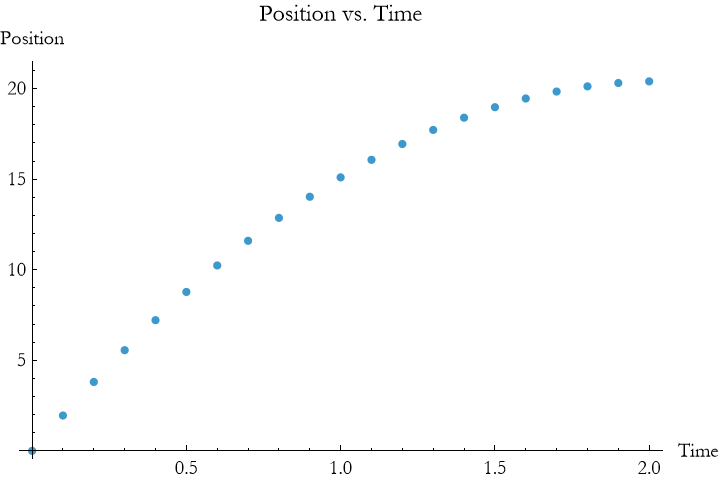
This module defines times and positions locally, uses a pure function to compute positions, and plots a parabolic curve for a ball dropped from 20 meters (x0 = 20, v0=0, a=−9.8). Local scoping ensures times and positions don’t affect variables outside the module.
Key features of modular programming include:
Local Variables: Variables like pos or times exist only within the module, preventing conflicts.
Reusability: Modules encapsulate tasks, like computing a trajectory, for reuse with different inputs.
Clarity: Group related code, making simulations easier to understand.
Terms and Definitions
Term/Definition 10.55 Modular programming: A programming style that organizes code into independent, reusable units called modules (or subroutines in some languages), making complex programs clearer, easier to maintain, and more testable.
Term/Definition 10.56 Module[] (in Wolfram Language): A block of code defined with Module[{variables}, body] that creates local (private) variables and performs operations, returning a result.
Term/Definition 10.57 Local scoping (or local variables): Variables defined inside a Module that exist only within that Module; they do not affect or interfere with variables of the same name outside.
Term/Definition 10.58 Global scoping (or global variables): Variables defined outside modules, accessible everywhere in the program (can lead to unintended changes).
Term/Definition 10.59 Scope: The region of code where a variable is visible and usable (local vs. global).
Term/Definition 10.60 Reusable code: Code encapsulated in modules/functions so it can be called multiple times with different inputs without rewriting.
Assumptions (the implicit beliefs the author relies on)
Assumption 10.30: Local scoping prevents variable name conflicts and unintended side effects in complex programs.
Assumption 10.31: Module[{vars}, body] is the standard way to create private variables in Wolfram Language.
Assumption 10.32: Global variables are risky in larger programs; local scoping is safer.
Assumption 10.33: Modules can contain loops, conditions, pure functions, plotting, etc. — full power of WL inside.
Assumption 10.34: Reusability reduces errors and speeds up exploration (change inputs, rerun module).
Principles
Principle 10.30: Local variables (defined in Module) exist only inside the module — prevents conflicts with global or other modules.
Principle 10.31: Global variables (defined outside) are accessible everywhere — use sparingly to avoid bugs.
Principle 10.32: Modules encapsulate tasks: compute position, simulate motion, plot results — call with different inputs.
Principle 10.33: Modules make code clearer: group related calculations, name them meaningfully (e.g., fallingPosition).
Principle 10.34: Modular code is maintainable: change one module, affects all calls.
Exercise 10.21: Begin with Term/Definition 10.55 and copy it into your notebook. Reflect on its meaning for a few minutes. Note any thoughts that come to mind. How would you explain this to someone sitting in front of you. Write this down. Then do this for each term/definition, assumption, and principal.
Exercise 10.22:
a) Define a Module function velocityModule[v_, t_] that computes a list of positions for an object moving at a constant velocity v (e.g., 7 m  ) over a time range from 0 to 5 seconds with 0.5 sec steps. Use local variables to calculate and return the positions, then plot them. Hint: Use Module[{pos}, pos = v # & /@ Range[0, 5, 0.5]; pos] and ListPlot. Context: Models a train moving at steady speed, demonstrating local variable scoping.
b) Create a Module function accelModule[v0_, a_, tmax_] that computes positions for an object starting with initial velocity v0 (e.g., 2 m  ) and acceleration a (e.g., 1.5 m
  ) up to time tmax=4 sec with 0.4 sec steps. Return and plot the positions. Hint: Use Module[{pos, times}, times = Range[0, tmax, 0.4]; pos = v0 # + 0.5 a #^2 & /@ times; pos] with ListPlot. Context: Simulates a car accelerating on a flat road, showcasing modular position tracking.
c) Define a Module function fallHeightModule[h0_, v0_, g_, tmax_] that calculates heights for an object dropped from height h0 (e.g., 15 m) with initial velocity v0 (e.g., -1 m  ) under the acceleration due to gravity g = 9.8 m
  up to tmax=2 sec with 0.2 sec steps. Plot the results. Hint: Use Module[{pos, times}, times = Range[0, tmax, 0.2]; pos = h0 + v0 # - 0.5 g #^2 & /@ times; pos] with ListPlot. Context: Models a weighted ball falling, emphasizing height variation with local scoping.
d) Create a Module function decelModule[v0_, b_, tmax_] that computes distances for an object decelerating from v0 (e.g., 8 m  ) with rate b (e.g., 0.5 m
  ) up to tmax=6 sec with 0.6 sec steps. Return and plot the distances. Hint: Use Module[{pos, times}, times = Range[0, tmax, 0.6]; pos = v0 # - 0.5 b #^2 & /@ times; pos] with ListPlot. Context: Simulates a sliding block slowing on a surface, highlighting modular deceleration.
e) Define a Module function windModule[v_, w_, tmax_] that calculates positions for an object moving at v (e.g., 3 m  ) with wind acceleration w (e.g., 0.4 m
  ) up to tmax=5 sec with 0.5 sec steps. Plot the results. Hint: Use Module[{pos, times}, times = Range[0, tmax, 0.5]; pos = v # + 0.5 w #^2 & /@ times; pos] with ListPlot. Context: Models a cart aided by wind, demonstrating reusable motion with local variables.
f) Create a Module function inclineModule[a_, tmax_] that computes distances for an object sliding down an incline with acceleration a (e.g., 2.5 m  ) from rest up to tmax=3 sec with 0.3 sec steps. Return and plot the distances. Hint: Use Module[{pos, times}, times = Range[0, tmax, 0.3]; pos = 0.5 a #^2 & /@ times; pos] with ListPlot. Context: Represents a ball rolling down a slope, showcasing modular dynamics with local scoping.
Mixing Paradigms
One of the huge advantages of the Wolfram Language lies in its ability to blend programming paradigms, letting you combine Imperative, Procedural, Functional, Rule-Based, and Modular approaches to solve physics problems efficiently. Mixing paradigms is like using multiple tools to build a model: each paradigm contributes its strengths, creating clear, reusable, and powerful code for simulations like a particle’s motion or a pendulum’s swing.
For example, consider calculating and plotting a particle’s position under constant acceleration (x = x0 + v0 t+0.5 a  ) with x0 = 20, v0 = 0, a = −9.8. A mixed-paradigm approach might look like this:

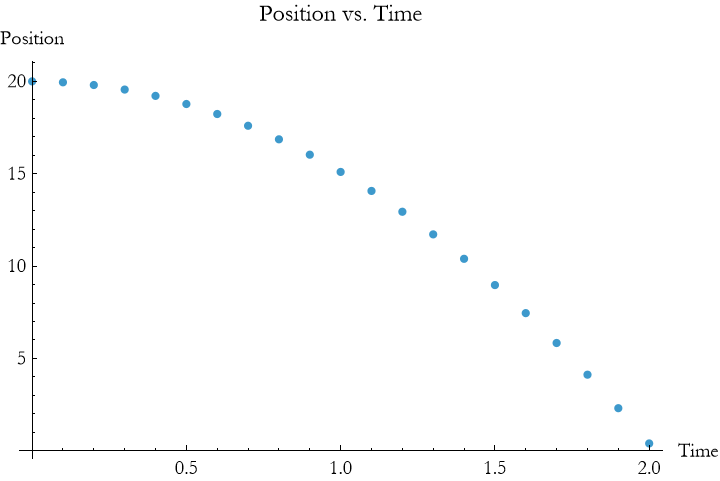
This code combines paradigms:
Modular: The Module encapsulates the simulation, using local variables (times, positions, rules) to avoid conflicts.
Rule-Based: Rules (x0 -> x0, v0 -> v0, a -> a) substitute parameters into the kinematic equation.
Functional: A pure function ((x0 + v0 # + 0.5 a #^2 /. rules) &) and /@ map the equation over times.
Procedural: The function motionSimulator is reusable, like a procedure, taking inputs and returning a plot.
One common complaint made about Mathematica and WL is that it is slow compared to other languages. The fact of the matter is that most of the code is written in procedural languages like python or C++, and that is not the most efficient paradigm. When you use the most efficient paradigms for the job you are performing, it is just as fast as any other program, assuming equivalent hardware.
In any case, in our example the result is a parabolic trajectory, computed concisely and organized clearly. Mixing paradigms lets you use functional programming’s elegance for calculations, rule-based programming’s flexibility for parameters, and modular programming’s structure for clarity.
Exercise 10.23:
a) Define a Module function velocityMix[v_, tmax_] that uses a rule vt/.v−>value to compute positions for an object moving at v = 5 m  over 0 to 6 sec with 0.5 sec steps. Incorporate a Map operation within the Module and plot the results. Hint: Use Module[{times, pos, rule}, times = Range[0, tmax, 0.5]; rule = v t /. {v -> 5}; pos = rule # & /@ times; pos] with ListPlot. Context: Models a boat drifting at constant speed, blending modular scoping with rule-based computation.
b) Create a Module function accelMix[v0_, a_, tmax_] that uses a Do loop to iteratively compute positions for an object with initial velocity v0=3 m  and acceleration a = 2 m
  up to tmax=4 sec with 0.4 sec steps. Apply a pure function v0 t+0.5 a
  and plot. Hint: Use Module[{pos = {}, t}, Do[AppendTo[pos, v0 t + 0.5 a t^2], {t, 0, tmax, 0.4}]; pos] with ListPlot. Context: Simulates a car accelerating, mixing procedural iteration with functional evaluation.
c) Define a Module function fallMix[h0_, v0_, g_, tmax_] that applies a rule h0+v0 t − 0.5 g  /.g−>9.8 to compute heights for an object dropped from h0=20 m with v0 = 0 m
  up to tmax=2t sec with 0.2 sec steps. Use Map and plot. Hint: Use Module[{times, pos, rule}, times = Range[0, tmax, 0.2]; rule = h_0 + v_0 t - 0.5 g t^2 /. {g -> 9.8}; pos = rule /. {h_0 -> 20, v_0 -> 0} # & /@ times; pos] with ListPlot. Context: Models a ball falling, combining modular encapsulation with rule-based flexibility.
d) Create a Module function decelMix[v0_, b_, tmax_] that uses imperative assignments to update positions for an object decelerating from v0=7 m  with rate b = 0.6 m
  up to tmax = 5 sec with 0.5 sec steps. Plot the distances. Hint: Use Module[{pos = 0, t}, Do[pos = pos + v0 t - 0.5 b
  , {t, 0, tmax, 0.5}]; {pos}] with ListPlot (adjust for step-wise sum if needed). Context: Simulates a sliding block, mixing imperative updates with modular structure.
e) Define a Module function windMix[v_, w_, tmax_] that uses a pure function v t+0.5 w  to compute positions for an object moving at v = 4 m
  with wind acceleration w = 0.3 m
  up to tmax = 6 sec with 0.6 sec steps. Plot the results. Hint: Use Module[{times, pos}, times = Range[0, tmax, 0.6]; pos = (4 # + 0.5 0.3 #^2 &) /@ times; pos] with ListPlot. Context: Models a cart aided by wind, blending functional mapping with modular scoping.
f) Create a Module function inclineMix[a_, tmax_] that applies a rule 0.5 a  /.a−>value to compute distances for an object sliding down an incline with a = 2 m
  from rest up to tmax = 3 sec with 0.3 sec steps. Use a Do loop to build the list and plot. Hint: Use Module[{pos = {}, t}, Do[AppendTo[pos, 0.5 a
  /. {a -> 2}], {t, 0, tmax, 0.3}]; pos] with ListPlot. Context: Represents a ball rolling down a slope, mixing rule-based transformation with procedural iteration.
Lists and List Manipulation
Lists in the Wolfram Language are ordered collections of data, like a table of positions or times in a physics experiment. They’re essential for storing and manipulating values, such as a particle’s trajectory or a pendulum’s angles. Lists are like notebooks where you record measurements and use tools to analyze them, making simulations easier to manage and visualize.
A list is written as {a, b, c}. For example, to store times from 0 to 2 seconds:


You can generate lists automatically with Range:


This creates a list from 0 to 2 in 0.1-second steps, perfect for physics calculations. To compute positions for a particle moving at constant velocity (5 m  )
)


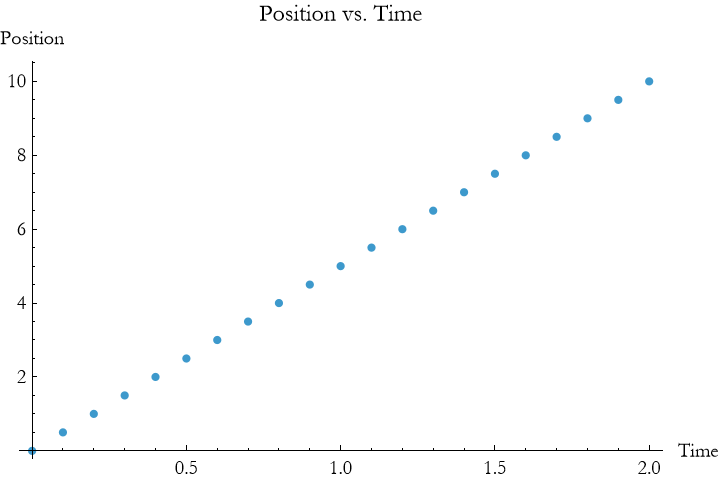
Here, # 5 & /@ times applies the pure function # 5 & to each time, producing positions from 0 to 10 meters, then plots a linear trajectory. This uses functional programming’s /@ to manipulate lists efficiently.
List manipulation includes operations like:
Appending: Add elements to a list with Append or AppendTo.
Extracting: Access elements with [[n]] (e.g., times[[2]] gets the second element).
Mapping: Apply functions to lists with /@ or Map.
Selecting: Filter elements with Select, like choosing positive positions.
For a falling object with position 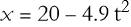 , you can compute and filter positions:


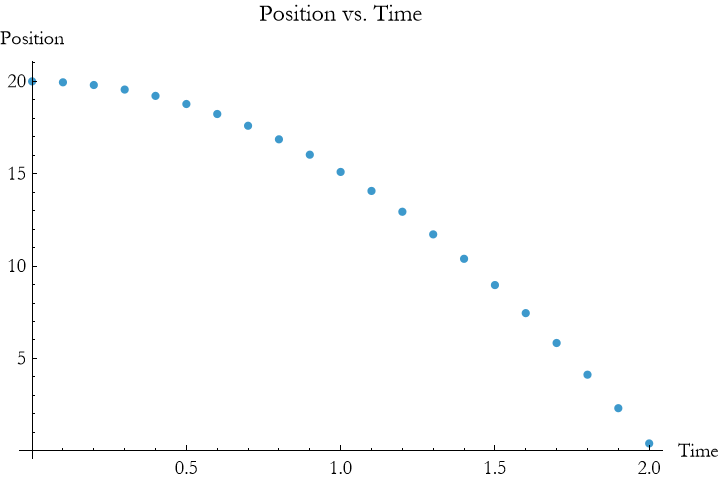
This uses a Module (modular programming), maps a pure function to compute positions, and uses Select to keep only non-negative positions (since the object hits the ground). The plot shows a parabolic trajectory, stopping at x ≥ 0.
Lists are versatile for physics. You can store {time, position} pairs:


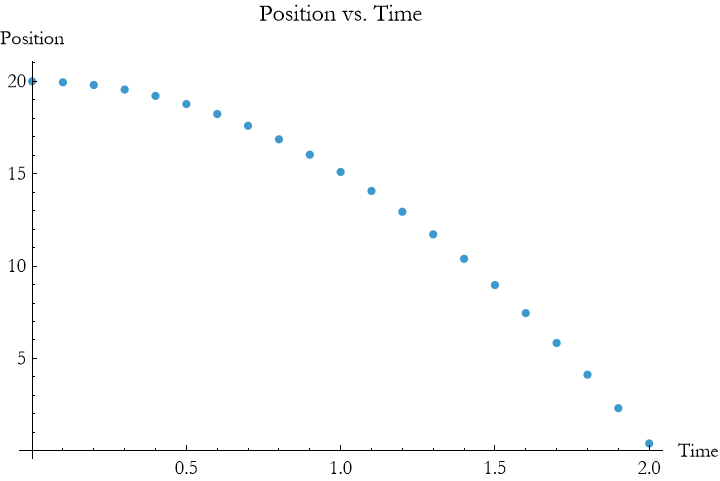
This uses Table (functional programming) to create a list of pairs, ready for plotting. You’ll use lists in the particle and pendulum examples to store and visualize data, combining paradigms for powerful simulations.
Terms and Definitions
Term/Definition 10.61 Select: A function that filters a list, keeping only elements that satisfy a condition (e.g., positive positions).
Assumptions (the implicit beliefs the author relies on)
Assumption 10.35: Lists are the natural way to store and manipulate sequences of data.
Assumption 10.36: Append/AppendTo is suitable for building lists inside loops or simulations.
Principles
Principle 10.35: Generate sequences with Range[start, end, step] for time steps or data points.
Principle 10.36: Apply calculations to lists with Map or /@ and pure functions (# & ) — efficient, concise, functional style.
Principle 10.37: Build lists dynamically: Append or AppendTo adds elements inside loops or simulations.
Exercise 10.24: Begin with Term/Definition 10.61 and copy it into your notebook. Reflect on its meaning for a few minutes. Note any thoughts that come to mind. How would you explain this to someone sitting in front of you. Write this down. Then do this for each term/definition, assumption, and principal.
Exercise 10.25:
a) Create a list of positions for an object moving at a constant velocity of 4 m  over 0 to 5 seconds with 0.5 sec steps using Range and Map with a pure function. Plot the results. Hint: Use positions = 4 # & /@ Range[0, 5, 0.5] and ListPlot[Transpose[{Range[0, 5, 0.5], positions}]]. Context: Models a car traveling at steady speed, demonstrating basic list generation and plotting.
b) Generate a list of positions for an object with initial velocity 3 m  and acceleration 1.2 m
  over 0 to 4 seconds with 0.4 sec steps using Map with the formula v0 t+0.5 a
  . Use AppendTo in a Do loop to build the list and plot. Hint: Use Module[{pos = {}}, Do[AppendTo[pos, 3 t + 0.5 1.2
  ], {t, 0, 4, 0.4}]; pos] with ListPlot. Context: Simulates a bicycle accelerating, showcasing list construction with imperative methods.
c) Create a list of heights for an object dropped from 25 m with initial velocity 0 m  under the acceleration due to gravity 9.8 m
  over 0 to 2.5 sec with 0.25 sec steps using Map. Use Select to keep only positive heights and plot. Hint: Use positions = (25 - 0.5 9.8 #^2) & /@ Range[0, 2.5, 0.25]; Select[positions, # > 0 &] with ListPlot. Context: Models a ball falling, highlighting data filtering to avoid negative values.
d) Generate a list of distances for an object decelerating from 6 m  with a rate of 0.5 m
  over 0 to 6 sec with 0.6 sec steps using a pure function with Map. Plot the results. Hint: Use positions = (6 # - 0.5 0.5 #^2) & /@ Range[0, 6, 0.6] and ListPlot[Transpose[{Range[0, 6, 0.6], positions}]]. Context: Simulates a skateboard slowing on a flat surface, demonstrating list-based motion tracking.
e) Create a list of positions for an object moving at 3 m  with wind acceleration 0.4 m
  over 0 to 5 sec with 0.5 sec steps using AppendTo in a While loop. Plot the trajectory. Hint: Use Module[{pos = {0}, t = 0}, While[t <= 5, AppendTo[pos, pos[[-1]] + 3 0.5 + 0.5 0.4
  ]; t += 0.5]; pos] with ListPlot. Context: Models a glider aided by wind, showcasing dynamic list building.
f) Generate a list of distances for an object sliding down an incline with acceleration 2 m  from rest over 0 to 3 sec with 0.3 sec steps using Table. Use Select to ensure non-negative values and plot. Hint: Use positions = Table[0.5 2 t^2, {t, 0, 3, 0.3}]; Select[positions, # >= 0 &] with ListPlot[Transpose[{Range[0, 3, 0.3], positions}]]. Context: Represents a ball rolling down a slope, emphasizing table-based data generation and filtering.
Parallel Programming
Parallel programming in the Wolfram Language uses multiple computer processors to perform calculations simultaneously, speeding up complicated calculations. It can effectively turn your computer into a miniature supercomputer. This is especially useful for large datasets or repetitive calculations in physics.
The Wolfram Language provides tools like ParallelMap and ParallelTable to distribute tasks across processors. For example, to compute positions for a particle moving at constant velocity (5 m/s) over times 0 to 3 seconds:


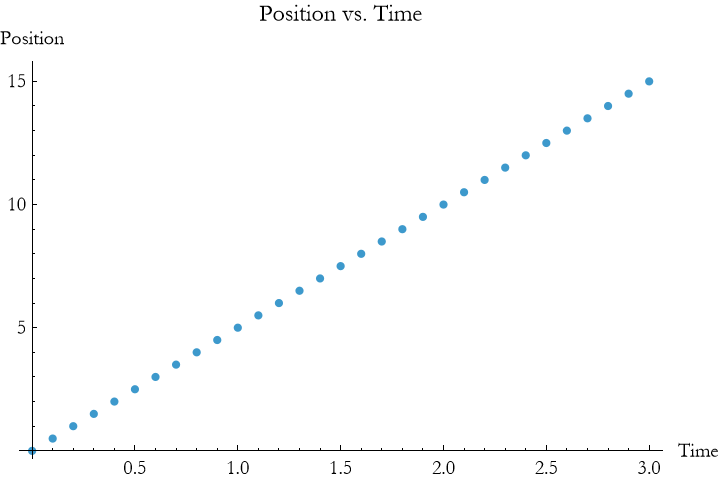
Here, ParallelMap applies the pure function # 5 & to each time in times across multiple processors, producing positions from 0 to 15 m. The result is identical to Map (from functional programming) but often faster for large lists. The ListPlot shows a linear trajectory.
Parallel programming shines in physics for tasks like computing trajectories with many points. For a falling object with position 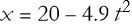

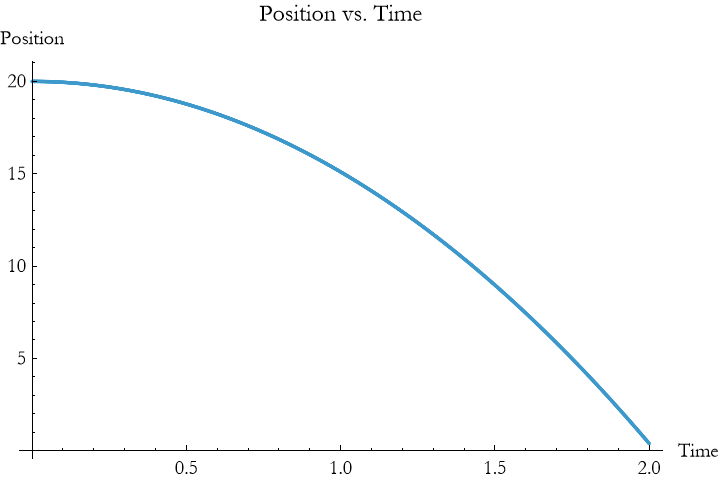
This uses ParallelTable to compute positions for a fine time grid (0.001-second steps), distributing calculations across processors. The result is a smooth parabolic curve, faster than a sequential Table for large datasets. Note that parallel tools require a system with multiple cores, and the Wolfram Language automatically manages processor allocation.
Key features of parallel programming include:
Distributed Tasks: Tools like ParallelMap and ParallelTable split work across processors.
Speed: Accelerates repetitive calculations, common in physics simulations.
Integration: Combines with functional (e.g., ParallelMap) and list manipulation techniques.
Terms and Definitions
Term/Definition 10.62 Parallel programming: A programming style that uses multiple computer processors (cores) to perform calculations simultaneously, speeding up repetitive or computationally intensive tasks.
Term/Definition 10.63 ParallelMap[] (Wolfram Language function): A parallel version of Map; applies a function to every element of a list across multiple processors, returning results faster on multi-core systems.
Term/Definition 10.64 ParallelTable[] (Wolfram Language function): A parallel version of Table; generates a table (list) by evaluating an expression for each iterator value across multiple processors.
Term/Definition 10.65 Multi-core: A computer processor with multiple independent processing units (cores) that can run tasks in parallel.
Term/Definition 10.66 Distributed computation: Splitting a task across multiple processors or even networked computers to reduce execution time.
Term/Definition 10.67 Lightweight Grid (in WL): A built-in feature for distributing computations across multiple cores or networked computers with Mathematica installed.
Assumptions (the implicit beliefs the author relies on)
Assumption 10.37: Modern computers have multiple cores, making parallel programming practical and effective for speeding up physics simulations.
Assumption 10.38: Repetitive calculations (e.g., positions over many time steps) benefit most from parallelization.
Assumption 10.39: Wolfram Language automatically manages processor allocation when using ParallelMap or ParallelTable.
Assumption 10.40: ParallelMap and ParallelTable produce identical results to Map and Table but faster on multi-core systems.
Assumption 10.41: Users have a multi-core computer to see speed benefits (though single-core still works, slower).
Principles
Principle 10.38: Parallel programming distributes work across multiple cores to speed up calculations.
Principle 10.39: Use ParallelMap for applying functions to lists in parallel (e.g., compute positions over times).
Principle 10.40: Use ParallelTable for generating tables/lists in parallel (e.g., fine time grids with small dt).
Exercise 10.26: Begin with Term/Definition 10.62 and copy it into your notebook. Reflect on its meaning for a few minutes. Note any thoughts that come to mind. How would you explain this to someone sitting in front of you. Write this down. Then do this for each term/definition, assumption, and principal.
Exercise 10.27:
a) Use ParallelMap to compute a list of positions for an object moving at a constant velocity of 6 m  over 0 to 7 seconds with 0.7 sec steps. Plot the results. Hint: Use positions = ParallelMap[6 # &, Range[0, 7, 0.7]] and ListPlot[Transpose[{Range[0, 7, 0.7], positions}]]. Context: Models a train moving at steady speed, demonstrating parallel computation for linear motion.
b) Create a list of positions for an object with initial velocity 4 m  and acceleration 1.5 m
  over 0 to 5 sec with 0.5 sec steps using ParallelTable. Plot the trajectory. Hint: Use positions = ParallelTable[4 t + 0.5 1.5
  , {t, 0, 5, 0.5}] and ListPlot[Transpose[{Range[0, 5, 0.5], positions}]]. Context: Simulates a car accelerating, showcasing parallel table generation.
c) Use ParallelMap to compute heights for an object dropped from 30 m with initial velocity 0 m  under gravity 9.8 m
  over 0 to 2.5 sec with 0.25 sec steps. Plot the results. Hint: Use positions = ParallelMap[30 - 0.5 9.8 #^2 &, Range[0, 2.5, 0.25]] and ListPlot[Transpose[{Range[0, 2.5, 0.25], positions}]]. Context: Models a ball falling, highlighting parallel mapping for gravitational motion.
d) Generate a list of distances for an object decelerating from 8 m  with a rate of 0.7 m
  over 0 to 6 sec with 0.6 sec steps using ParallelTable. Plot the distances. Hint: Use positions = ParallelTable[8 t - 0.5 0.7
  , {t, 0, 6, 0.6}] and ListPlot[Transpose[{Range[0, 6, 0.6], positions}]]. Context: Simulates a sled slowing on ice, demonstrating parallel computation for deceleration.
e) Use ParallelMap to compute positions for an object moving at 5 m  with wind acceleration 0.2 m
  over 0 to 4 sec with 0.4 sec steps. Plot the trajectory. Hint: Use positions = ParallelMap[5 # + 0.5 0.2 #^2 &, Range[0, 4, 0.4]] and ListPlot[Transpose[{Range[0, 4, 0.4], positions}]]. Context: Models a cart aided by wind, showcasing parallel processing for enhanced motion.
f) Create a list of distances for an object sliding down an incline with acceleration 2.5 m  from rest over 0 to 3 sec with 0.3 sec steps using ParallelTable. Plot the results. Hint: Use positions = ParallelTable[0.5 2.5
  , {t, 0, 3, 0.3}] and ListPlot[Transpose[{Range[0, 3, 0.3], positions}]]. Context: Represents a ball rolling down a slope, emphasizing parallel computation for incline motion.
Summary
Write a summary of this lesson.
For Further Study
Stephen Wolfram, (2017), An Elementary Introduction to the Wolfram Language, Wolfram Publishing, 2nd Edition. This is a really good book written by the creator of Mathematica/WL.
Paul Wellin, (2013), Programming with Mathematica: An Introduction, Cambridge University Press. Extremely useful introduction to the basic ideas, though it is a bit dated for cutting edge use of commands.
Robert L. Zimmerman, Frederick I. Olness, (2002), Mathematica for Physics, Springer. This is very good for physics applications, it is n ot up-to-date with respect to all of the functions used. It would be a very useful exercise to covert all of the programs to modern commands.